Back
Next
3.3
Feedback
Feedback provides you with a methodology to provide students with feedback based on their answer.
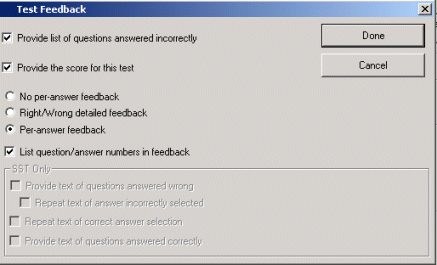
Most question types let you supply the student with feedback based on whether or not they got the question right or wrong.
For multiple choice questions, you may provide feedback if the student got the answer correct or based on their choice.

Back
Next
Testing
1.
Creating
1.1
An overview of ReadyGo's test engine
1.2
About Tests
1.3
Getting Started
1.4
Question Types
2.
Test Questions
2.1
Creating Multiple Choice questions
2.2
Creating Multiple Selection questions
2.3
Creating Multiple Selection (Pull-down) questions
2.4
Creating Select from Pull-down questions
2.5
Creating True/False questions
2.6
Creating Text Entry questions
2.7
Creating Numeric questions
2.8
Creating Ranking/Sequence questions
2.9
Creating Preference questions
2.10
Creating Picture Click Multiple Choice questions
2.11
Creating Picture Click Single Region questions
2.12
Creating Matching Column questions
2.13
Creating Drag-drop Matching Column questions
2.14
Creating Drag-drop Matching to Image questions
2.15
Creating Custom questions
3.
Configuring
3.1
Customize links to Test pages
3.2
Mastery and Weight
3.3
Feedback
3.4
Configuration
3.5
Labels and Text
3.6
Scoring
3.7
Pooling
3.8
Certificates
3.9
Test Page Display
3.10
Test only chapter
3.11
Omit Navigation
3.12
Progress Control
3.13
Creating 360 Test Questions
4.
Tracking
4.1
Tracking Test Results
4.2
SST Features
Home
Site Map
ReadyGo WCB V8.1.5